Awx - Give a Project a Custom Virtual Env
AWX - give a project a custom virtualenv in a container-based install#
AWX no longer uses custom virtualenvs. It now uses execution environments. See moving to execution environments or the execution environments docs.
When you create a new project on AWX you get the following screen:
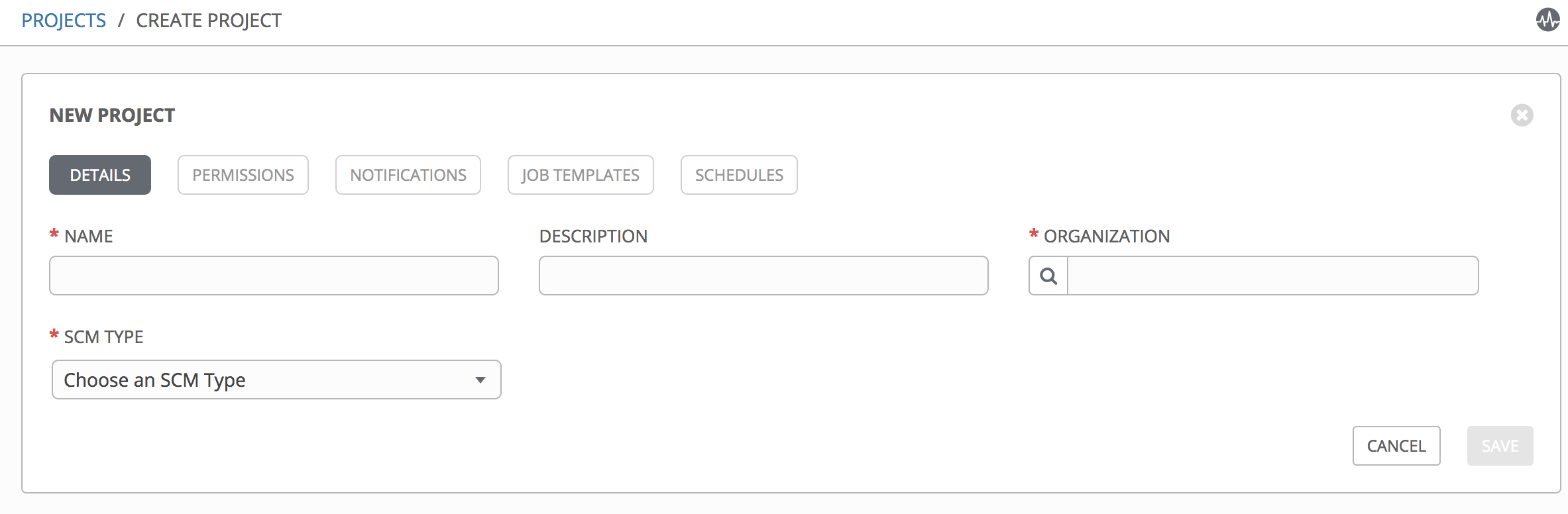
It does not have the Ansible Environment field because no custom environments are set up.
Sometimes certain playbooks need extra dependencies that do not make sense in the default Ansible virtual environment.
I used the AWX documentation on setting up custom venvs.
Our AWX instance was installed with the Docker Compose method, so it was running in containers.
The containers looked like this:
docker ps
CONTAINER ID        IMAGE                        COMMAND                  CREATED             STATUS              PORTS                                                 NAMES
351190a1796b        postgres:9.6                 "docker-entrypoint.s..." 11 months ago       Up 24 hours         5432/tcp                                              postgres
eaaa7c833053        ansible/awx_task:3.0.1       "/tini -- /bin/sh -c..." 11 months ago       Up 24 hours         8052/tcp                                              awx_task
dfa79d5a48d7        ansible/awx_web:3.0.1        "/tini -- /bin/sh -c..." 11 months ago       Up 24 hours         0.0.0.0:80->8052/tcp                                  awx_web
517f39e0d8d0        memcached:alpine             "docker-entrypoint.s..." 11 months ago       Up 24 hours         11211/tcp                                             memcached
f16b15845a94        ansible/awx_rabbitmq:3.7.4   "docker-entrypoint.s..." 11 months ago       Up 24 hours         4369/tcp, 5671-5672/tcp, 15671-15672/tcp, 25672/tcp   rabbitmq
The one we are focused on is ansible/awx_task
Get into that Docker container:
docker exec -it awx_task /bin/bash
We are in the /var/lib/awx folder and can see the venv folder in this directory:
[root@awx awx]# pwd
/var/lib/awx
The recommendation is to create the venv in /opt.
Create the folder:
cd /opt
mkdir custom_venvs
You then need to tell AWX which directory to look in for custom venvs:
HTTP PATCH /api/v2/settings/system/ {'CUSTOM_VENV_PATHS': ["/opt/custom_venvs/"]}
Create the venv in that folder:
cd /opt/custom_venvs
python3 -m venv vdc_venv
Install dependencies:
source /opt/custom_venvs/vdc_venv/bin/activate
pip install psutil
pip install -U "ansible == 2.9.1"
pip install -r requirements.txt
This failed because the container did not have gcc:
distutils.errors.CompileError: command 'gcc' failed with exit status 1
One possible workaround is to install gcc in the container, but that still did not work cleanly in this case.
I then tried without psutil:
pip install -U "ansible == 2.7.6"
The working approach was to add the venv to both the awx_task and awx_web containers in /var/lib/awx/venv. AWX then picked it up.
This Stack Overflow answer pointed me in the right direction.
The next problem was that the playbook needed a Python 3 interpreter and errored with:
Traceback (most recent call last):
    File "/usr/local/bin/ansible", line 30, in <module>
        import shutil
    File "/usr/lib64/python3.6/shutil.py", line 10, in <module>
        import fnmatch
    File "/usr/lib64/python3.6/fnmatch.py", line 14, in <module>
        import re
    File "/usr/lib64/python3.6/re.py", line 142, in <module>
        class RegexFlag(enum.IntFlag):
AttributeError: module 'enum' has no attribute 'IntFlag'
This happened when I set this on the host:
ansible_python_interpreter: /usr/bin/python3
One option is to create the environment on the host and mount it into the container, provided the Python version matches.
The Python version was:
Python 3.6.6 (default, Aug 13 2018, 18:24:23)
In the end, I installed the dependencies on the local environment instead.
This does not have persistence. If you destroy the container, the venv will disappear and you have to recreate it.
Ideally the custom venv setup should be part of the deployment process
Update: use the custom_venv_dir variable#
In your awx deployment inventory there is a variable called: custom_venv_dir
If you set that variable, which only works on a local install, the custom venv directory will be created on the host and bind mounted into the relevant Docker containers.
Eg.
custom_venv_dir: '/opt/awx-custom-venvs/'
Now you can create and manage your venv on the host and it will be mirrored into the containers.
You still need to assign the virtualenv to the org
The easiest way is through the browsable API.
Go to v2/settings/system/ and patch:
{"CUSTOM_VENV_PATH":["/opt/awx_venvs"]}
Actually, the easiest route is to go to Settings -> System in the frontend and set it there.